Wash Sale Rules
Overview
Section titled “Overview”PrivateACB includes support for the US wash sale rule (IRS §1091), which affects how cryptocurrency losses are reported for tax purposes. This guide explains what wash sales are, how PrivateACB handles them, and how to enable or disable this feature.
Default setting: Wash sale rule is disabled by default due to regulatory uncertainty.
What is a Wash Sale?
Section titled “What is a Wash Sale?”Definition
Section titled “Definition”A wash sale occurs when you:
- Sell a security (or cryptocurrency) at a loss, and
- Buy the same or substantially identical security within 30 days before or after the sale
What Happens in a Wash Sale
Section titled “What Happens in a Wash Sale”When a wash sale is detected, the IRS does not allow you to claim the loss in the current tax year. Instead:
- The loss is denied (you cannot deduct it from your taxes this year)
- The loss is added to the cost basis of the replacement purchase
- You can claim the loss later when you sell the replacement purchase
Example
Section titled “Example”Without Wash Sale Rule:
- January 5: Buy 1 BTC at $50,000
- February 3: Sell 1 BTC at $48,000 → Loss of $2,000 (deductible in 2024)
- February 28: Buy 1 BTC at $47,000
With Wash Sale Rule Applied:
- January 5: Buy 1 BTC at $50,000
- February 3: Sell 1 BTC at $48,000 → Loss of $2,000 denied (not deductible in 2024)
- February 28: Buy 1 BTC at $47,000
- New cost basis: $47,000 + $2,000 (denied loss) = $49,000
- The $2,000 loss will be deductible when you sell the February 28 purchase
Why this happened: The February 28 purchase was within 30 days of the February 3 sale (25 days after), triggering the wash sale rule.
The 61-Day Window
Section titled “The 61-Day Window”The wash sale rule looks at a 61-day window around each sale:
30 days BEFORE        Sale Date        30 days AFTER     |                    |                    |     v                    v                    v  Jan 4  ←─────────→  Feb 3  ←─────────→  Mar 5
Any purchase of the same asset during this 61-day windowwill trigger a wash sale if the Feb 3 sale was a loss.
Examples of Wash Sales
Section titled “Examples of Wash Sales”| Sale Date | Sale Price | Purchase Date | Purchase Price | Wash Sale? | Why? |
|---|---|---|---|---|---|
| Feb 3 | $48,000 (loss) | Feb 28 | $47,000 | YES | Purchase within 30 days after |
| Feb 3 | $48,000 (loss) | Jan 15 | $46,000 | YES | Purchase within 30 days before |
| Feb 3 | $48,000 (loss) | Mar 10 | $45,000 | NO | Purchase more than 30 days after (35 days) |
| Feb 3 | $52,000 (gain) | Feb 28 | $47,000 | NO | Sale was a gain, not a loss |
How PrivateACB Detects Wash Sales
Section titled “How PrivateACB Detects Wash Sales”Automatic Detection
Section titled “Automatic Detection”When you run an ACB calculation with wash sales enabled, PrivateACB:
- Examines every sale transaction
- Checks if it resulted in a loss (proceeds less than cost basis)
- Searches for replacement purchases within the 61-day window
- If found, applies the wash sale rule:
- Denies 100% of the loss
- Adjusts the cost basis of the replacement purchase
- Records the wash sale in your database
- Marks the capital gain record as “wash sale applied”
Where You’ll See Wash Sales
Section titled “Where You’ll See Wash Sales”After running a calculation with wash sales enabled, you can find wash sale information in several places:
1. Job Display Name
Section titled “1. Job Display Name”All calculation jobs now show wash sale status in their display name:
Example with wash sales ON:
BTC United States FIFO (WS: ON, 3 detected) - Nov 11, 2025Example with wash sales OFF:
BTC United States FIFO - Nov 11, 2025This lets you instantly see which calculations used wash sales and how many were detected.
2. Calculation Dashboard Config Bar
Section titled “2. Calculation Dashboard Config Bar”When setting up a US calculation with wash sales enabled, the Config Bar (Zone A) shows your jurisdiction, method, and tax year. The Rules Banner (Zone B) confirms wash sale status before you start the calculation.
3. Calculation History (Zone D)
Section titled “3. Calculation History (Zone D)”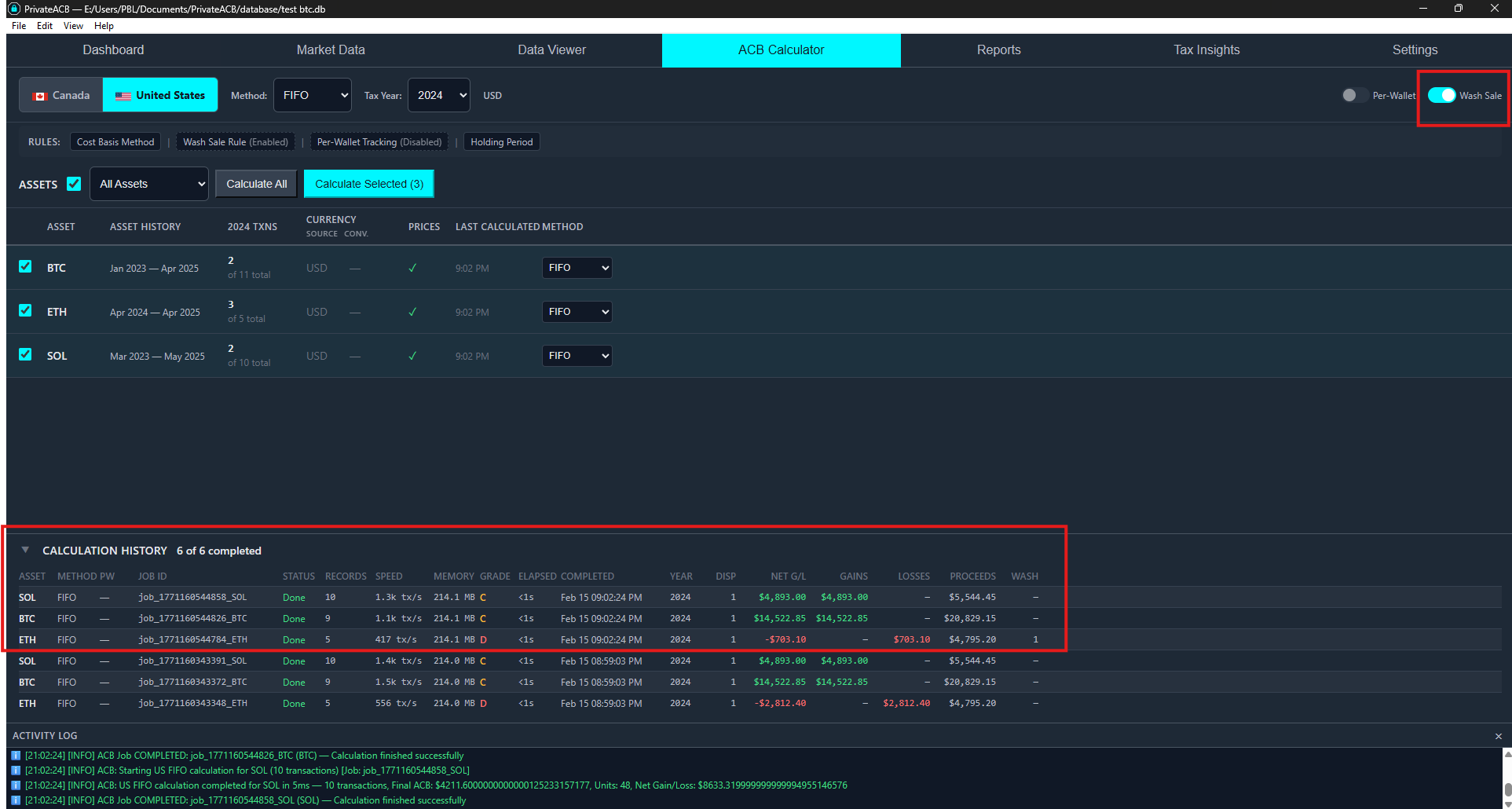
After a successful calculation, the Calculation History table at the bottom of the dashboard shows financial results for each job, including wash sale detection counts and deferred loss amounts.
4. Capital Gains Table (Database)
Section titled “4. Capital Gains Table (Database)”Each capital gain record has a wash_sale_applied column:
0= No wash sale (loss is deductible)1= Wash sale applied (loss was denied)
If a record has wash_sale_applied = 1, the capital_gain column will show 0.0 instead of the negative loss amount.
5. Wash Sales Table (Database)
Section titled “5. Wash Sales Table (Database)”The wash_sales table contains detailed information about each wash sale:
- Original disposal date and loss amount
- Replacement purchase date and record ID
- Basis adjustment amount
- Asset symbol
6. Tax Lot Basis Adjustment
Section titled “6. Tax Lot Basis Adjustment”The replacement purchase’s tax lot will have an increased cost basis equal to the denied loss. This ensures the loss is preserved for when you eventually sell the replacement.
Enabling or Disabling Wash Sales
Section titled “Enabling or Disabling Wash Sales”Step-by-Step Instructions
Section titled “Step-by-Step Instructions”- Open PrivateACB and load your database
- Navigate to the Settings tab (Ctrl+7)
- Find the “US Wash Sale Rule” section
- Toggle the switch to turn wash sales ON or OFF
- OFF (default): Wash sale rule will NOT be applied to calculations
- ON: Wash sale rule WILL be applied to all future US calculations
What Happens When You Change the Setting
Section titled “What Happens When You Change the Setting”The setting is saved immediately (with a 1-second delay to avoid multiple saves).
- Enable or disable wash sales in Settings (Ctrl+7)
- Navigate to the ACB Calculator tab (Ctrl+4)
- Select United States jurisdiction in the Config Bar
- Select your calculation method (FIFO, LIFO, or HIFO)
- Select your asset(s) in the Asset Table
- Click “Calculate” to run a new calculation
The new calculation will use the updated wash sale setting.
Checking Current Setting
Section titled “Checking Current Setting”To verify whether wash sales are currently enabled:
- Open the Settings tab (Ctrl+7)
- Look for “US Wash Sale Rule”
- Check the toggle switch:
- Blue/highlighted = Wash sales are ON
- Gray/unhighlighted = Wash sales are OFF
When to Use Wash Sales
Section titled “When to Use Wash Sales”Consider Enabling If:
Section titled “Consider Enabling If:”- ✅ You are conservative with tax reporting and want to apply IRS rules even if unclear
- ✅ Your tax advisor recommends treating cryptocurrency as a security for wash sale purposes
- ✅ You want to see the impact of wash sales on your tax liability (you can compare calculations with it on vs. off)
- ✅ You frequently trade the same cryptocurrency (buy and sell within short timeframes)
Consider Disabling If:
Section titled “Consider Disabling If:”- ✅ You believe cryptocurrency does not qualify as a security under IRC §1091
- ✅ Your tax advisor recommends NOT applying wash sales to cryptocurrency
- ✅ You want to claim all losses in the current tax year
- ✅ You rarely or never repurchase the same cryptocurrency within 30 days of a sale
Regulatory Uncertainty
Section titled “Regulatory Uncertainty”As of 2025, the IRS has not issued clear guidance on whether wash sale rules apply to cryptocurrency. Some facts to consider:
Arguments FOR applying wash sales to crypto:
- Some tax professionals recommend conservative treatment
- Future IRS guidance may require it retroactively
- Crypto may be considered “substantially similar” to traditional securities
Arguments AGAINST applying wash sales to crypto:
- IRC §1091 specifically mentions “stocks or securities,” not property or commodities
- IRS has historically treated cryptocurrency as property (like real estate), not securities
- No official IRS publication confirms wash sales apply to crypto
PrivateACB’s Position: We provide the feature as an option but default to disabled. You should consult with a qualified tax professional to determine the appropriate treatment for your situation.
Comparing Calculations With and Without Wash Sales
Section titled “Comparing Calculations With and Without Wash Sales”Strategy: Run Calculations Both Ways
Section titled “Strategy: Run Calculations Both Ways”You can run two separate calculations to see the difference:
-
First calculation: Wash sales OFF
- Go to Settings (Ctrl+7) → Turn wash sales OFF
- Go to ACB Calculator (Ctrl+4) → Calculate your asset (e.g., BTC FIFO)
- Note the total capital gains/losses
-
Second calculation: Wash sales ON
- Go to Settings (Ctrl+7) → Turn wash sales ON
- Go to ACB Calculator (Ctrl+4) → Calculate your asset again (BTC FIFO)
- Note the new total capital gains/losses
-
Compare the results:
- If wash sales ON shows higher gains (or lower losses), that’s the deferred loss amount
- Check the Calculation History (Zone D) to see exactly how much loss was deferred
Example Comparison
Section titled “Example Comparison”Scenario: You sold Bitcoin 10 times in 2024, with 3 sales resulting in losses totaling $6,500.
| Setting | Total Capital Gains | Explanation |
|---|---|---|
| Wash sales OFF | $12,000 | All losses are deductible |
| Wash sales ON | $16,200 | $4,200 in losses denied due to wash sales |
In this example, 3 of your loss sales triggered wash sales, and $4,200 of the $6,500 total losses were denied (the other $2,300 in losses did not have replacement purchases within 61 days).
Impact on Different Calculation Methods
Section titled “Impact on Different Calculation Methods”FIFO (First In, First Out)
Section titled “FIFO (First In, First Out)”FIFO selects the oldest lots first when you sell. This method:
- Often results in more gains (if prices have risen over time)
- May produce fewer wash sales because older lots tend to have lower cost bases
- Example: If you bought BTC at $30K (2022) and $60K (2024), selling in 2024 will use the $30K lot first (likely a gain, not a loss)
LIFO (Last In, First Out)
Section titled “LIFO (Last In, First Out)”LIFO selects the newest lots first when you sell. This method:
- Often results in more losses (if prices have fallen recently)
- May produce more wash sales because recent purchases create losses, and you may repurchase shortly after
- Example: If you bought BTC at $60K (January) and sold at $50K (February), then bought again at $48K (March), LIFO will trigger a wash sale
HIFO (Highest In, First Out)
Section titled “HIFO (Highest In, First Out)”HIFO selects the highest cost basis lots first. This method:
- Minimizes gains (or maximizes losses) for tax optimization
- Often produces the most wash sales because it deliberately creates losses by selling high-cost lots
- Example: If you bought BTC at $40K, $50K, and $60K, selling at $55K will use the $60K lot first (creating a $5K loss that may trigger a wash sale)
Key Insight
Section titled “Key Insight”Wash sales are ONLY triggered by losses. If your calculation method produces only gains (no losses), you will have zero wash sales even with the rule enabled.
In your own testing, you may have noticed:
- FIFO with wash sales ON → 0 wash sales detected
- LIFO with wash sales ON → 3 wash sales detected
- HIFO with wash sales ON → 3 wash sales detected
This is because FIFO produced no losses with your transaction data (all sells were at a gain), while LIFO and HIFO produced losses by selecting different lots.
Frequently Asked Questions
Section titled “Frequently Asked Questions”Q: Does enabling wash sales change which lots are selected?
Section titled “Q: Does enabling wash sales change which lots are selected?”A: No. The wash sale rule does not affect lot selection. FIFO still selects oldest lots first, LIFO selects newest lots first, and HIFO selects highest-cost lots first. Wash sales only affect how losses are reported, not which lots are sold.
Q: If I enable wash sales, will it recalculate all my old jobs?
Section titled “Q: If I enable wash sales, will it recalculate all my old jobs?”A: No. Changing the wash sale setting does not automatically recalculate existing jobs. You must manually run new calculations after changing the setting.
Q: Can I have some calculations with wash sales and some without?
Section titled “Q: Can I have some calculations with wash sales and some without?”A: Not currently. The wash sale setting is global and applies to all US calculations. However, you can run multiple calculations at different times with different settings (e.g., calculate BTC with wash sales OFF, then change the setting and calculate BTC again with wash sales ON). Both calculation results are saved separately in your database.
Q: What if I enable wash sales midway through the year?
Section titled “Q: What if I enable wash sales midway through the year?”A: You should recalculate. If you ran calculations earlier in the year with wash sales OFF, then later decide to enable them, you should re-run your calculations to get accurate results. Old calculations will not be updated.
Q: Does the wash sale rule apply to Canadian calculations?
Section titled “Q: Does the wash sale rule apply to Canadian calculations?”A: No. The wash sale rule is a US-only rule (IRS §1091). Canada has a similar rule called the “superficial loss rule,” which is always enabled and cannot be disabled (it’s mandatory under Canadian tax law). PrivateACB automatically applies the superficial loss rule to all Canadian ACB calculations.
Q: How do I see which specific transactions triggered wash sales?
Section titled “Q: How do I see which specific transactions triggered wash sales?”A: Check the database tables. You can view:
- Wash Sales table - Shows each wash sale with disposal date, replacement date, and loss amount
- Capital Gains table - Look for
wash_sale_applied = 1to see which sales were affected - Tax Lots table - Replacement lots will have increased
total_costdue to basis adjustment
Alternatively, export a US Tax Audit Report, which includes detailed wash sale information.
Q: Can I claim the deferred loss in a future year?
Section titled “Q: Can I claim the deferred loss in a future year?”A: Yes, eventually. The deferred loss is added to the cost basis of the replacement purchase. When you sell that replacement purchase (even if it’s years later), the deferred loss will effectively reduce your gain (or increase your loss) at that time. This is handled automatically by PrivateACB’s lot tracking system.
Q: What happens if I sell the replacement purchase at a loss within 30 days of buying it again?
Section titled “Q: What happens if I sell the replacement purchase at a loss within 30 days of buying it again?”A: Another wash sale. Wash sales can chain indefinitely if you keep selling at a loss and repurchasing within 30 days. Each time, the loss is deferred and added to the next replacement lot’s basis. You’ll only realize the accumulated losses when you either:
- Sell without repurchasing within 30 days, or
- Hold the replacement lot past the 30-day window
Technical Details
Section titled “Technical Details”Wash Sale Window Calculation
Section titled “Wash Sale Window Calculation”PrivateACB calculates the 61-day window as:
- Start: 30 days before the sale date (at 00:00:00)
- End: 30 days after the sale date (at 23:59:59)
- Includes: The sale date itself
Example:
- Sale date: February 3, 2024
- Window start: January 4, 2024, 00:00:00
- Window end: March 4, 2024, 23:59:59
- Total: 61 days
Substantially Identical Securities
Section titled “Substantially Identical Securities”For cryptocurrency, PrivateACB considers assets “substantially identical” if they have the same asset symbol. For example:
- Selling BTC and buying BTC = substantially identical (wash sale possible)
- Selling BTC and buying ETH = NOT substantially identical (no wash sale)
Basis Adjustment Method
Section titled “Basis Adjustment Method”When a wash sale is detected, PrivateACB:
- Sets the capital gain to $0 (denying the full loss)
- Identifies the first replacement purchase in the 61-day window
- Adds the denied loss amount to that purchase’s tax lot cost basis
- Records the adjustment in the wash sale record
If there are multiple replacement purchases, only the first one (earliest date) receives the basis adjustment.
Reporting Wash Sales to the IRS
Section titled “Reporting Wash Sales to the IRS”Form 8949
Section titled “Form 8949”Wash sales must be reported on IRS Form 8949 (Sales and Other Dispositions of Capital Assets). PrivateACB’s Form 8949 export includes:
- All capital gain/loss transactions
- Wash sale adjustments in the appropriate columns
- Adjusted cost basis for sales affected by wash sales
- Code “W” in the adjustment column (if applicable)
Schedule D
Section titled “Schedule D”Totals from Form 8949 flow to Schedule D (Capital Gains and Losses). Wash sales reduce your net capital loss for the year but preserve the loss for future years through basis adjustments.
Audit Provenance
Section titled “Audit Provenance”PrivateACB maintains a complete audit provenance record of wash sales:
- Original loss amounts
- Denied loss amounts
- Replacement purchase dates and IDs
- Basis adjustment amounts
- Timestamps of when wash sales were detected
You can export this information using the US Tax Audit Report feature for IRS documentation.
Best Practices
Section titled “Best Practices”1. Decide Early in the Tax Year
Section titled “1. Decide Early in the Tax Year”Determine whether you’ll apply wash sales before making trades or running calculations. This ensures consistency throughout the year.
2. Consult a Tax Professional
Section titled “2. Consult a Tax Professional”Given the regulatory uncertainty, consult with a CPA or tax attorney who specializes in cryptocurrency taxation before enabling wash sales.
3. Keep Records
Section titled “3. Keep Records”Export your wash sale reports and save them with your tax records. If the IRS ever issues guidance requiring wash sales on crypto, you’ll have documentation showing you applied the rules conservatively.
4. Test Both Scenarios
Section titled “4. Test Both Scenarios”Run calculations with wash sales both ON and OFF to understand the impact on your tax liability. This helps you make an informed decision about which approach to use.
5. Document Your Position
Section titled “5. Document Your Position”If you choose NOT to apply wash sales to cryptocurrency, document your reasoning (e.g., “Cryptocurrency is property, not a security, per IRS Notice 2014-21”). This shows due diligence if questioned by the IRS.
Related Resources
Section titled “Related Resources”- IRS Publication 550 - Investment Income and Expenses (Wash Sale Rule)
- IRC §1091 - Loss from Wash Sales of Stock or Securities
- IRS Notice 2014-21 - Virtual Currency Guidance (treats crypto as property)
- PrivateACB Settings Tab (Ctrl+7) - Where you enable/disable wash sales
- PrivateACB ACB Calculator Tab (Ctrl+4) - Where you run calculations
- PrivateACB Reports Tab (Ctrl+5) - Export Form 8949 and US Tax Audit Report
Summary
Section titled “Summary”Key Takeaways:
- Wash sale rule is OPTIONAL - Disabled by default due to regulatory uncertainty
- Only affects LOSSES - Gains are not affected by wash sales
- 61-day window - 30 days before + sale date + 30 days after
- Loss is deferred, not lost - Added to replacement purchase basis
- Enable in Settings - Takes effect for all future calculations
- Recalculate to apply - Old calculations are not automatically updated
- Consult a professional - Tax advisor should guide your decision
Quick Guide:
- To enable: Settings (Ctrl+7) → US Wash Sale Rule → Toggle ON → Calculate
- To disable: Settings (Ctrl+7) → US Wash Sale Rule → Toggle OFF → Calculate
- To compare: Run calculations with both settings and compare results
Last Updated: February 2026 Applies to: PrivateACB 2.0 Jurisdiction: United States only IRS Code: §1091
Need Help?
Section titled “Need Help?”If you have questions about wash sales or how PrivateACB handles them:
- Review this guide thoroughly
- Check the Settings tab (Ctrl+7) to verify your current wash sale setting
- Run test calculations with a small dataset to see how wash sales affect results
- Consult with a qualified tax professional about your specific situation
- Export the US Tax Audit Report to see detailed wash sale information
Last Updated: February 2026 PrivateACB Version: 2.0