US Tax Reports
Overview
Section titled “Overview”After completing your tax calculations, PrivateACB generates comprehensive tax reports that help you file your US federal income taxes accurately. This guide explains how to access, view, and export the tax reports you need for IRS compliance.
What you’ll learn:
- How to access your calculated tax reports
- What each report shows and why it matters
- How to export reports to PDF or CSV
- How to use these reports for your tax filing
Prerequisites: You must have completed a tax calculation first (see US Tax Calculation Guide)
Available US Reports
Section titled “Available US Reports”PrivateACB provides 6 report types for US tax filers:
| Report Name | Purpose | IRS Form | Required? |
|---|---|---|---|
| Form 8949 | Individual sales transactions | Form 8949 | Yes (if you sold crypto) |
| Schedule D | Capital gains/losses summary | Schedule D | Yes (if you sold crypto) |
| Income Report | Income from mining/staking | Schedule C or Schedule 1 | Yes (if you have crypto income) |
| Lot Tracking | Active tax lots breakdown | N/A | No (for your records) |
| Wash Sale Report | Denied loss details | N/A | No (supporting documentation) |
| Audit Provenance | Comprehensive audit provenance | N/A | No (audit defense) |
Accessing Tax Reports
Section titled “Accessing Tax Reports”Step 1: Navigate to the Reports Tab
Section titled “Step 1: Navigate to the Reports Tab”- Open your PrivateACB database
- Click the Reports tab in the top navigation bar
- The Reports interface opens with a sidebar on the left and a report viewer on the right
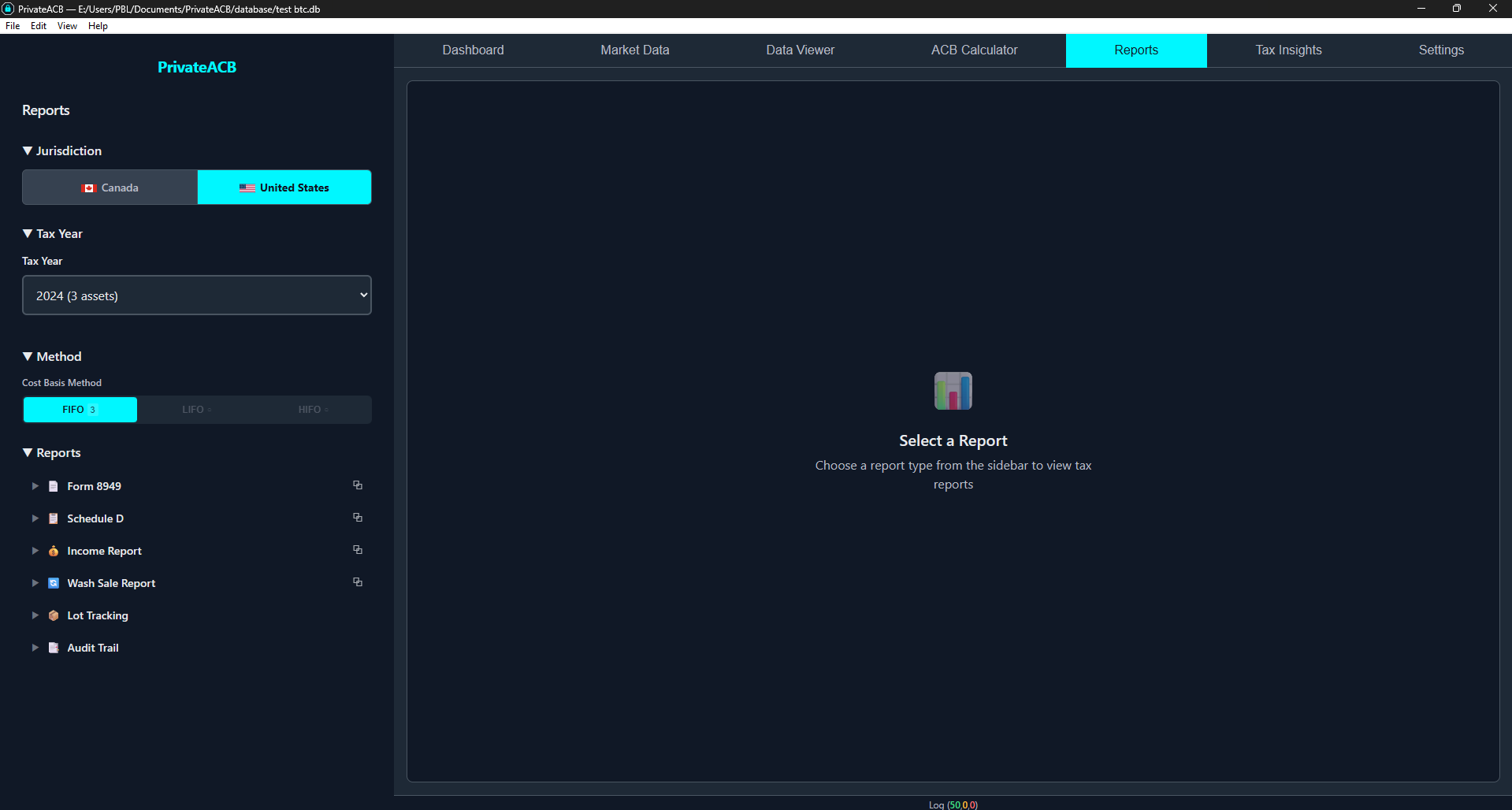
Step 2: Select Jurisdiction
Section titled “Step 2: Select Jurisdiction”In the sidebar, click United States in the jurisdiction toggle at the top.
Step 3: Select Tax Year and Method
Section titled “Step 3: Select Tax Year and Method”Below the jurisdiction toggle:
- Use the Tax Year dropdown to select the year you’re filing for (e.g., 2024). Each year shows an asset count to help identify which years have data.
- Use the Method dropdown to select your cost basis method: FIFO, LIFO, or HIFO. This filters the report data to jobs calculated with that method.
Step 4: Select a Report Type
Section titled “Step 4: Select a Report Type”In the Reports section of the sidebar, click any report name to expand it. You’ll see two selection options for most reports:
Aggregate mode — Combines data from all calculated assets into one report. This is what you typically want for tax filing.
Individual job mode — Shows data for a single asset’s calculation. Use this for per-asset analysis.
Which mode to use:
- Form 8949, Schedule D, Income Report, Wash Sale: Start with Aggregate for your tax filing. Use Individual for per-asset analysis.
- Lot Tracking, Audit Provenance: These always require selecting an individual job (a specific asset’s calculation).
Understanding Each Report
Section titled “Understanding Each Report”Form 8949 — Sales and Other Dispositions of Capital Assets
Section titled “Form 8949 — Sales and Other Dispositions of Capital Assets”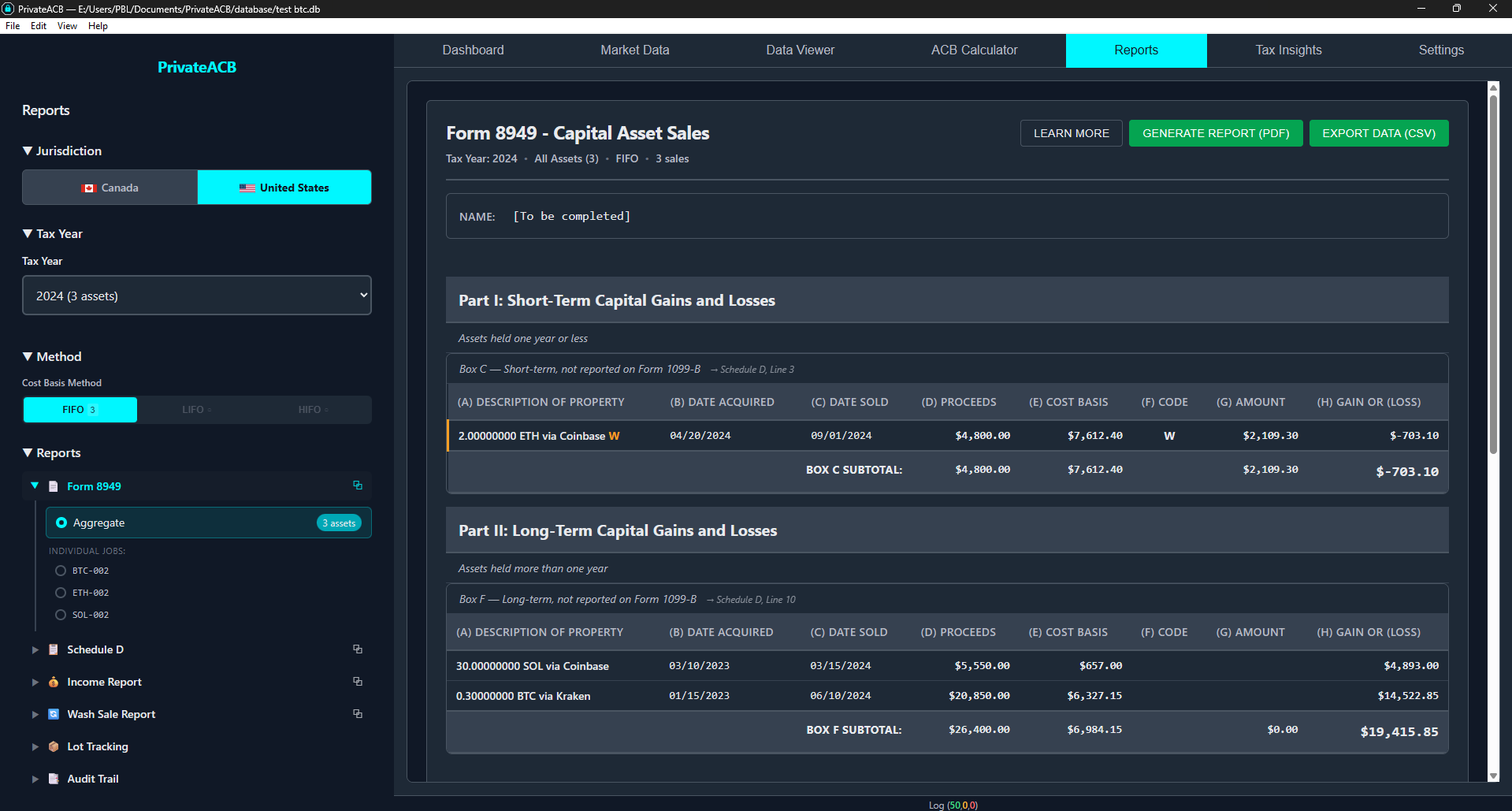
Purpose: Report every individual cryptocurrency sale/trade to the IRS IRS Form: Form 8949 Required: Yes, if you sold or traded cryptocurrency in the tax year
What it shows:
- Part I (Short-term): Disposals held 1 year or less
- Part II (Long-term): Disposals held more than 1 year
- For each transaction: description, dates, proceeds, cost basis, adjustments, gain/loss
Form 8949 columns:
| Column | Description |
|---|---|
| (a) Description | Quantity and asset (e.g., “0.5000 BTC”) |
| (b) Date acquired | When you bought this specific lot |
| (c) Date sold | When you sold/traded it |
| (d) Proceeds | Sale amount |
| (e) Cost basis | What you paid (per your lot selection method) |
| (f) Code | Adjustment code (e.g., “W” for wash sale) |
| (g) Adjustment | Amount of adjustment |
| (h) Gain/Loss | Proceeds minus cost basis plus adjustments |
Box categorization (2025 and later):
Starting with tax year 2025, Form 8949 transactions are grouped into box categories (G/H/I for short-term, J/K/L for long-term) based on whether your exchange issued a 1099-DA form and whether cost basis was reported. For 2024 and earlier, the simpler Box C (short-term) and Box F (long-term) apply.
See the 1099-DA & Account-by-Account Guide for the complete box category tables and how to configure your exchange 1099-DA status.
How to use Form 8949:
- Review each transaction for accuracy
- Check that all sales/trades are included
- Note the totals at the bottom of each part
- Transfer totals to Schedule D
- Export to PDF and attach to your Form 1040
Schedule D — Capital Gains and Losses
Section titled “Schedule D — Capital Gains and Losses”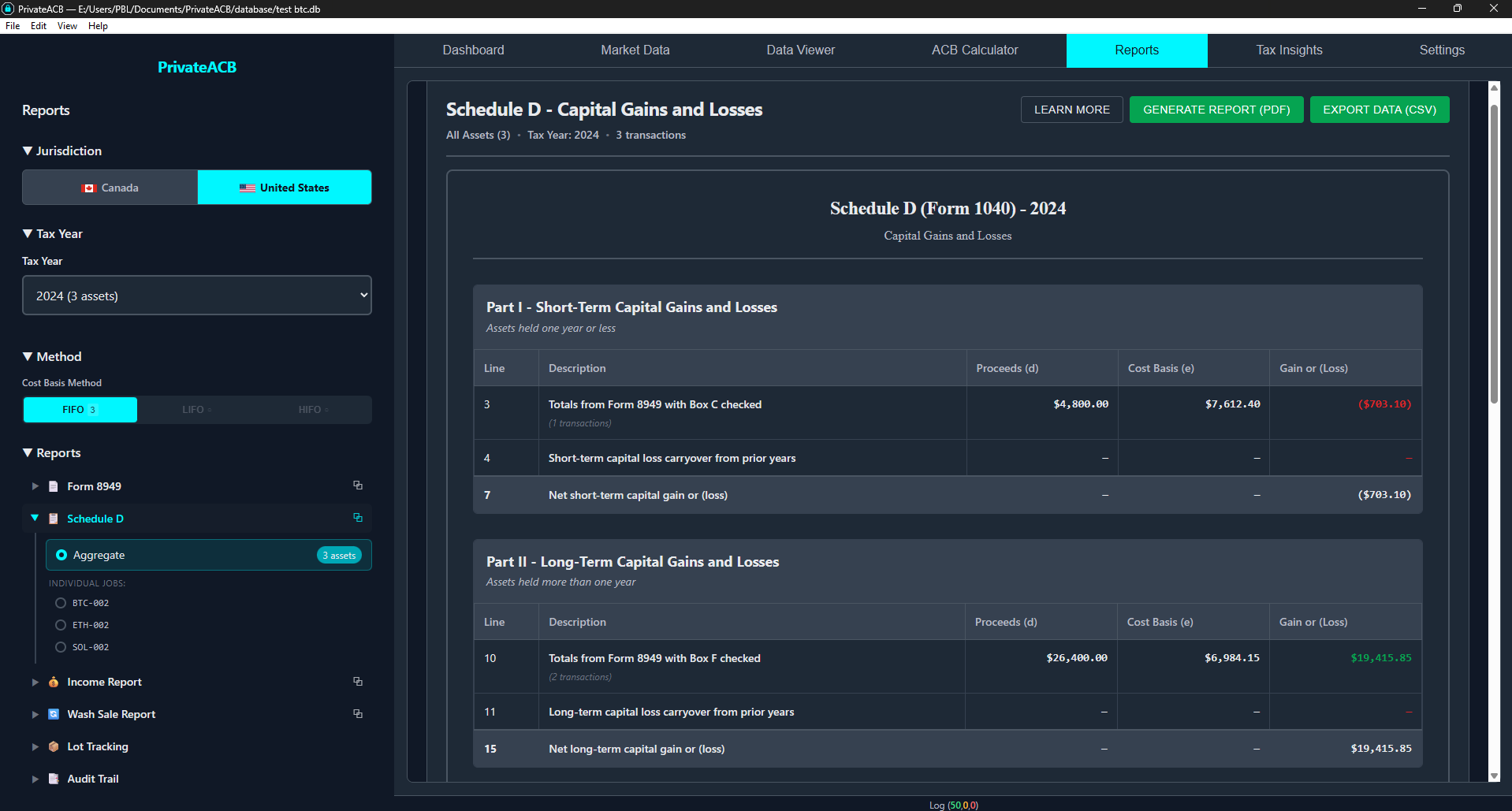
Purpose: Summarize total capital gains/losses and calculate tax liability IRS Form: Schedule D (Form 1040) Required: Yes, if you sold or traded cryptocurrency
What it shows:
- Part I: Short-term gains/losses (from Form 8949 Part I), with columns (d) Proceeds, (e) Cost Basis, (g) Adjustments, and (h) Gain or Loss per line item
- Part II: Long-term gains/losses (from Form 8949 Part II), same columns
- Part III: Net capital gain/loss (Line 16 = Line 7 + Line 15)
Schedule D is available in both modes: Aggregate (all assets combined — typical for filing) and Individual (single asset — for per-asset analysis).
IRS line numbers PrivateACB populates:
| Part | Line | Description |
|---|---|---|
| I | 1b, 2, 3 | Form 8949 box totals (short-term). For ≤2024: Line 3 only |
| I | 6 | Short-term capital loss carryover |
| I | 7 | Net short-term capital gain or (loss) |
| II | 8b, 9, 10 | Form 8949 box totals (long-term). For ≤2024: Line 10 only |
| II | 14 | Long-term capital loss carryover |
| II | 15 | Net long-term capital gain or (loss) |
| III | 16 | Combined net (Line 7 + Line 15) |
Line-level breakdown (2025 and later):
For tax year 2025+, Schedule D breaks down each part by Form 8949 box (Lines 1b/2/3 for short-term, Lines 8b/9/10 for long-term). For 2024 and earlier, only Line 3 (short-term) and Line 10 (long-term) are used. See the 1099-DA & Account-by-Account Guide for the full line-by-box mapping.
Tax rates (for reference):
- Short-term gains: Taxed as ordinary income (10%-37%)
- Long-term gains: Taxed at preferential rates (0%, 15%, or 20% based on income)
- Capital losses: Deductible up to $3,000/year ($1,500 married filing separately). Excess carries forward to future years indefinitely. PrivateACB calculates and displays this limit automatically.
How to use Schedule D:
- Verify totals match Form 8949
- Note the net capital gain/loss
- Transfer to Form 1040, Line 7a
Income Report — Mining, Staking, and Airdrops
Section titled “Income Report — Mining, Staking, and Airdrops”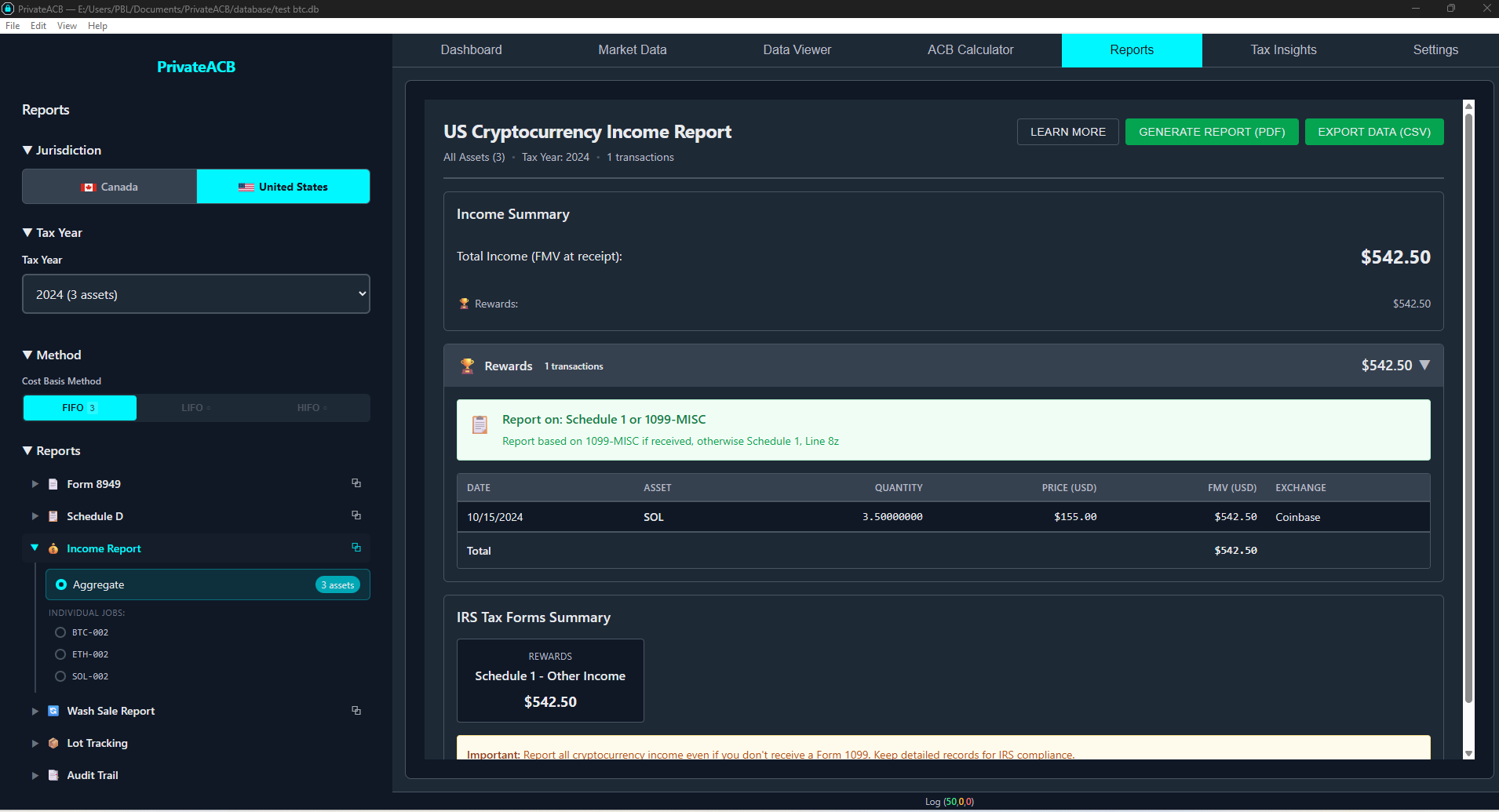
Purpose: Report cryptocurrency income (not capital gains) IRS Forms: Schedule C (self-employment) or Schedule 1, Line 8z (other income) Required: Yes, if you earned cryptocurrency from mining, staking, rewards, or airdrops
What it shows:
- Every income transaction (mining, staking, airdrops, rewards, interest, dividends, cashback, bonuses, referrals, forks, realized PnL)
- Date received, quantity, fair market value in USD, income category
- Summary totals by category
How to report income:
- Mining as a business: Report on Schedule C (can deduct expenses)
- Casual/hobby income: Report on Schedule 1, Line 8z
- Staking: Usually Schedule 1, Line 8z
Important IRS rules:
- Income is valued on the date received, not when you sell
- The FMV becomes your cost basis for that crypto
- Staking rewards are taxable in the year received (Rev. Rul. 2023-14)
Lot Tracking Report — Active Tax Lots
Section titled “Lot Tracking Report — Active Tax Lots”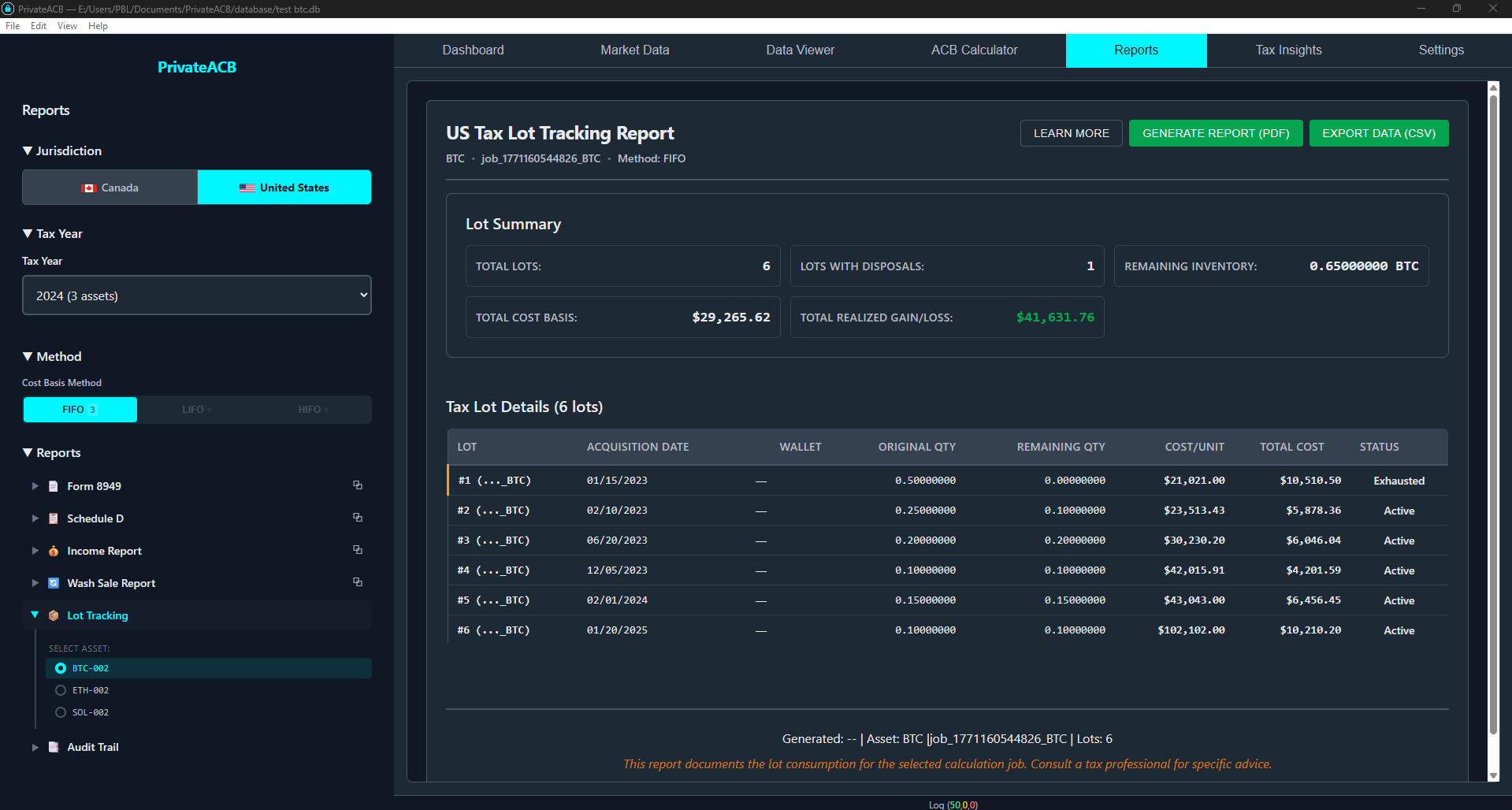
Purpose: Detailed breakdown of cryptocurrency you currently own, lot by lot IRS Form: None (for your own records) Selection: Requires selecting an individual job (specific asset)
What it shows for each lot:
- Acquisition date
- Original and remaining quantity
- Cost per unit and total cost basis
- Holding period (days)
- Short-term or long-term classification
- Account (if account-by-account tracking is enabled for 2025+)
- Status: Active or Exhausted
Summary totals:
- Total lots (active and exhausted)
- Total cost basis
- Short-term vs. long-term breakdown
How to use it:
- See exactly what you own and what you paid, lot by lot
- Plan future sales — identify which lots will be consumed next based on your method
- Tax planning — long-term lots (held > 365 days) get lower tax rates
- Verify calculations against your exchange records
Wash Sale Report
Section titled “Wash Sale Report”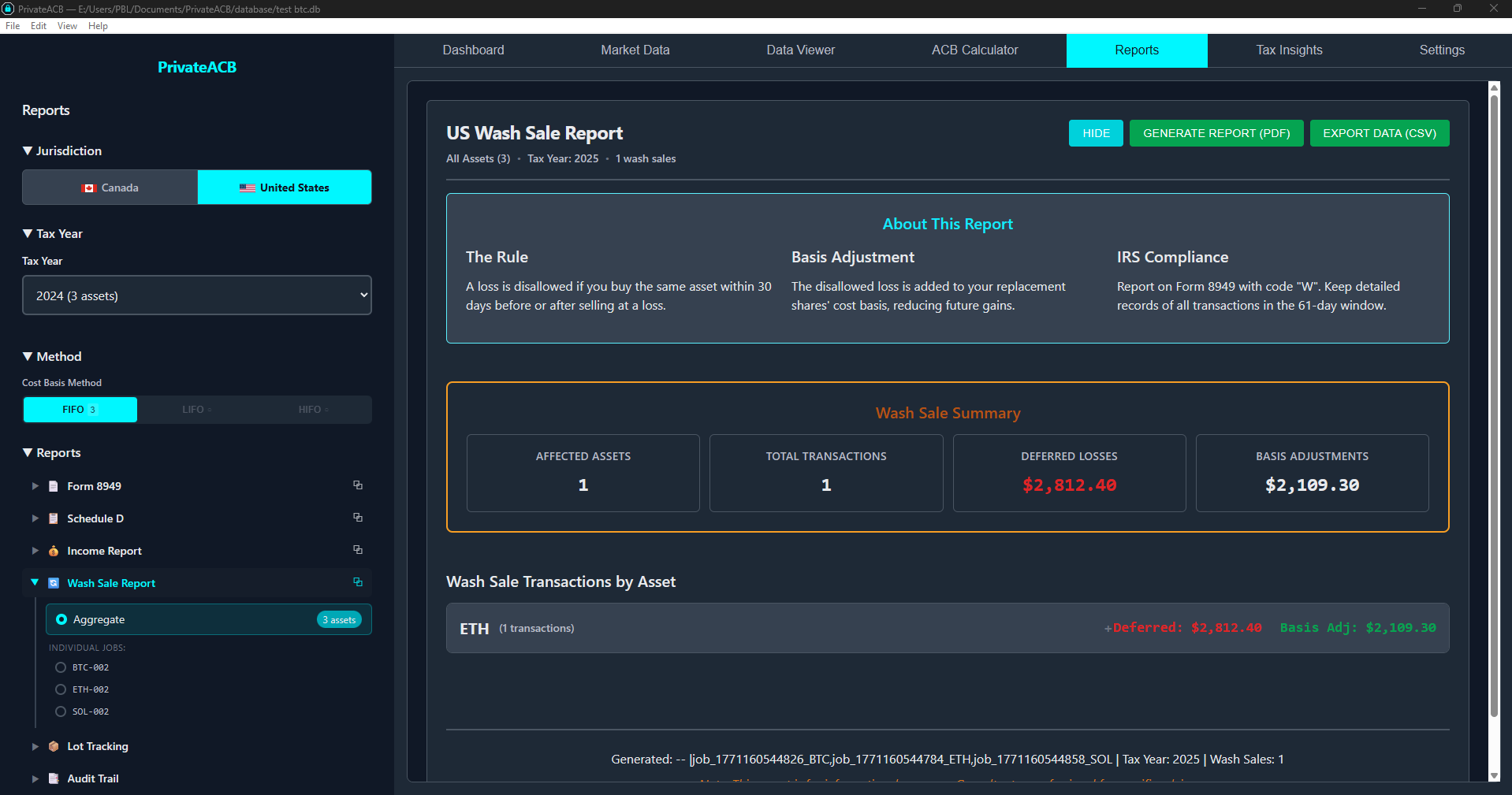
Purpose: Detailed breakdown of denied capital losses IRS Form: None (supporting documentation for Form 8949) Relevance: Only contains data if you enabled the wash sale rule in the ACB Calculator’s Config Bar
What the report shows:
- Each wash sale transaction
- Original loss amount
- Denied loss (100% in US — not prorated like Canada)
- Replacement purchase details
- Cost basis adjustment on the replacement lot
How to use it:
- Review to understand why losses were denied
- Note that denied losses increase your replacement lot’s cost basis (loss is deferred, not eliminated)
- Export for your records in case of IRS audit
If wash sale rule is disabled (default): This report will be empty. For details on how wash sales work, see the Wash Sale Guide.
Audit Provenance — Comprehensive Audit Provenance
Section titled “Audit Provenance — Comprehensive Audit Provenance”Purpose: Complete audit documentation showing data lineage and calculation methodology IRS Form: None (for audit defense) Selection: Requires selecting an individual job (specific asset)
The Audit Provenance report has 6 collapsible sections (7 for US filers with Account-by-Account enabled):
| Section | Content |
|---|---|
| Data Sources | Which imports and exchanges contributed to this calculation |
| Import Trail | Details of each import — file names, row counts, validation |
| Calculation Metadata | Parameters used — method, tax year, account-by-account settings |
| Reconciliation | Data integrity checks — transaction counts match, no orphaned records |
| Rule Applications | Tax rules applied and decisions made (wash sale triggers, lot selections) |
| System Events | Timestamped log of all operations during calculation |
| Account-by-Account Basis | (US 2025+ only) Lot snapshot by account, transfer lot movements, regulatory compliance statement (T.D. 10000) |
How to use it:
- Keep for 7 years (IRS statute of limitations)
- If IRS questions your calculations, this proves methodology and data lineage
- Shows you used a consistent lot selection method
- Demonstrates all transactions were included and validated
Exporting Reports
Section titled “Exporting Reports”Export Formats
Section titled “Export Formats”- PDF — Professional documents for filing and printing. Headers, footers, metadata included.
- CSV — Spreadsheet format for analysis in Excel/Google Sheets or importing into tax software.
How to Export
Section titled “How to Export”- Select and view the report
- Click “Generate Report (PDF)” or “Export Data (CSV)” inside the report viewer
- Choose save location in the dialog
- File is saved with an auto-generated name (e.g.,
Form8949_US_BTC_2024_2026-02-15.pdf)
Trial vs. Licensed
Section titled “Trial vs. Licensed”| Feature | Trial | Licensed |
|---|---|---|
| View reports | Yes | Yes |
| Export PDF/CSV | No (locked) | Yes |
| Copy report data | No (protected) | Yes |
A US license unlocks US report exports. A Combined license unlocks both US and Canadian exports.
Common Scenarios
Section titled “Common Scenarios”Scenario 1: First-Time Filing
Section titled “Scenario 1: First-Time Filing”Steps:
- Go to Reports, select United States, tax year 2024, method (e.g., FIFO)
- Click Form 8949 > Aggregate — Review all transactions, export to PDF
- Click Schedule D — Verify totals match Form 8949, export to PDF
- Click Income Report — If you have mining/staking income, export to PDF
- Click Audit Provenance for each asset — Export for your records (keep 7 years)
File with IRS:
- Form 8949 + Schedule D attached to Form 1040
- Income on Schedule C (business) or Schedule 1, Line 8z
Scenario 2: HIFO to Minimize Taxes
Section titled “Scenario 2: HIFO to Minimize Taxes”Steps:
- View Lot Tracking — See which lots remain (lowest-cost lots should still be active)
- View Form 8949 — Verify cost basis for each sale is from the highest-cost lots
- View Schedule D — Compare net gain to what FIFO would have produced
Higher cost basis = lower capital gains = lower taxes. HIFO is especially effective in rising markets.
Scenario 3: Wash Sales
Section titled “Scenario 3: Wash Sales”Steps:
- View Form 8949 — Look for Code “W” in the adjustment column
- View Wash Sale Report — See each denied loss and replacement lot adjustment
- View Lot Tracking — Verify replacement lots have increased cost basis
Denied losses are deferred, not eliminated. The increased cost basis on replacement lots means lower future gains.
Scenario 4: IRS Audit Request
Section titled “Scenario 4: IRS Audit Request”Steps:
- Export Form 8949 and Schedule D for the questioned tax year
- Export Audit Provenance for each questioned asset — shows complete data lineage
- Export Lot Tracking — shows current holdings and cost basis
- Send all reports with a cover letter explaining your consistent methodology
Scenario 5: Account-by-Account Tracking (2025+)
Section titled “Scenario 5: Account-by-Account Tracking (2025+)”For tax year 2025+, IRS T.D. 10000 requires account-by-account cost basis tracking. When enabled, Lot Tracking shows an Account column, Form 8949 uses account-specific lot matching, and all reports display a “Tracking: Account-by-Account” indicator. See the Account-by-Account Tracking Guide for details.
Troubleshooting
Section titled “Troubleshooting””No data” or empty report
Section titled “”No data” or empty report”No calculations exist for the selected jurisdiction/tax year/method combination. Go to the ACB Calculator, run calculations, then return to Reports.
Export buttons are locked
Section titled “Export buttons are locked”You’re in trial mode. Purchase a US or Combined license to unlock exports.
Form 8949 totals don’t match Schedule D
Section titled “Form 8949 totals don’t match Schedule D”Check that you’re comparing the right sections (Form 8949 Part I totals go to Schedule D Part I). If wash sale rule is enabled, adjustments affect the totals.
Lot Tracking shows unexpected lots
Section titled “Lot Tracking shows unexpected lots”Your selected method (FIFO/LIFO/HIFO) determines which lots are consumed:
- FIFO: Oldest consumed first → newest lots remain
- LIFO: Newest consumed first → oldest lots remain
- HIFO: Most expensive consumed first → cheapest lots remain
Schedule D shows loss but I can’t deduct it all
Section titled “Schedule D shows loss but I can’t deduct it all”IRS limits capital loss deductions to $3,000/year ($1,500 married filing separately). Excess losses carry forward to future years.
Best Practices
Section titled “Best Practices”1. Choose a Method and Stay Consistent
Section titled “1. Choose a Method and Stay Consistent”Pick a lot selection method (FIFO, LIFO, or HIFO) for each asset and use it consistently year-to-year. While changing methods between years is permitted (per §1.1012-1(j)(4), it’s not an accounting method change), frequent changes may raise audit questions. You can use different methods for different assets.
Recommendation for most users: HIFO — minimizes capital gains by consuming highest-cost lots first.
2. Generate and Keep Reports Annually
Section titled “2. Generate and Keep Reports Annually”After each tax year, generate all required reports and export to PDF. Keep for 7 years (IRS statute of limitations). Back up your PrivateACB database.
3. Review Before Filing
Section titled “3. Review Before Filing”Cross-check reports against exchange statements. Verify transaction counts, dates, and amounts. Consider having a crypto-savvy CPA review the reports.
4. Understand Wash Sale Implications
Section titled “4. Understand Wash Sale Implications”The wash sale rule toggle is in the ACB Calculator’s Config Bar (disabled by default). If enabled, review the Wash Sale Report to understand denied losses. See the Wash Sale Guide for details.
5. Export in Both Formats
Section titled “5. Export in Both Formats”PDF for official filing. CSV for analysis in Excel, importing into tax software (TurboTax, H&R Block), or sharing with your accountant.
Related Guides
Section titled “Related Guides”- US Tax Calculation Guide — How to run calculations
- US Tax Formulas (Technical) — Mathematical details
- Wash Sale Guide — Understanding the wash sale rule
- Account-by-Account Tracking Guide — T.D. 10000 compliance for 2025+
- Market Data Guide — Setting up exchange rates
- Import Flow Guide — Importing transaction data
Jurisdiction: United States Tax Authority: Internal Revenue Service (IRS) Last Updated: February 2026 PrivateACB Version: 2.0