Australian Tax Reports
Overview
Section titled “Overview”After completing your CGT calculations, PrivateACB generates comprehensive tax reports that help you file your Australian income tax return accurately. This guide explains how to access, view, and export the reports you need for ATO compliance.
What you’ll learn:
- How to access your calculated tax reports
- What each report shows and why it matters
- How to export reports to PDF or CSV
- How to use these reports for your tax filing
Prerequisites: You must have completed a CGT calculation first (see Australian CGT Calculation Guide)
Available Australian Reports
Section titled “Available Australian Reports”PrivateACB provides 5 report types for Australian tax filers:
| Report Name | Purpose | ATO Reference | Required? |
|---|---|---|---|
| CGT Summary | Net capital gain calculation (Q18) | Individual Tax Return, Question 18 | Yes (if you disposed of crypto) |
| CGT Worksheet | Per-disposal detail with discount eligibility | Supporting schedule | Yes (supporting documentation) |
| Income Report | Income from staking, mining, airdrops | Individual Tax Return, Question 2 | Yes (if you have crypto income) |
| Lot Tracking | Active and exhausted tax lot inventory | N/A | No (for your records) |
| Audit Provenance | Full provenance and calculation trace | N/A | No (audit defence) |
Accessing Tax Reports
Section titled “Accessing Tax Reports”Step 1: Navigate to the Reports Tab
Section titled “Step 1: Navigate to the Reports Tab”- Open your PrivateACB database
- Click the Reports tab in the top navigation bar
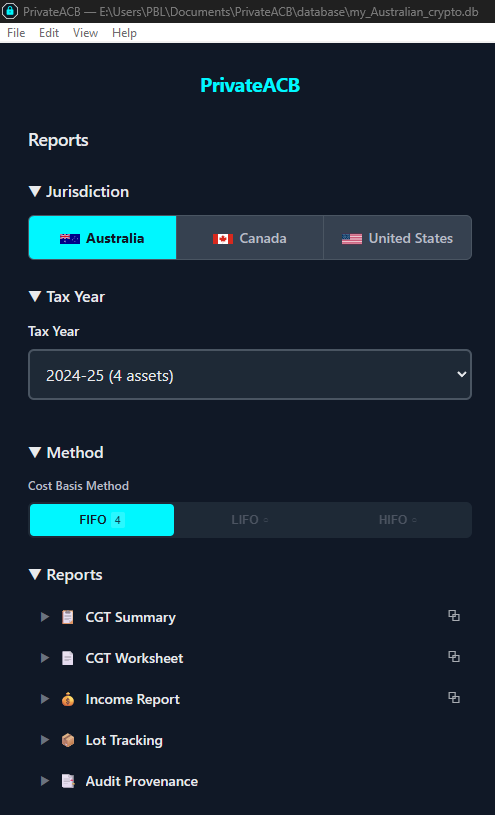
- The Reports interface opens with a sidebar on the left and a report viewer on the right
Step 2: Select Jurisdiction
Section titled “Step 2: Select Jurisdiction”In the sidebar, click Australia in the jurisdiction toggle at the top. The report list below will update to show Australian reports.
Step 3: Select Tax Year and Method
Section titled “Step 3: Select Tax Year and Method”Below the jurisdiction toggle:
- Use the Tax Year dropdown to select the financial year you’re filing for (e.g., “2024-25”). Each year shows an asset count to help identify which years have data.
- Use the Method dropdown to select your cost basis method: FIFO, LIFO, or HIFO. This filters the report data to calculations run with that method.
Step 4: Select a Report Type
Section titled “Step 4: Select a Report Type”In the Reports section of the sidebar, click any report name to expand it. You will see two selection options for most reports:
Aggregate mode — Combines data from all calculated assets into one report. This is what you typically want for tax filing.
Per-asset mode — Shows data for a single asset. Useful for reviewing individual cryptocurrencies in detail.
CGT Summary Report
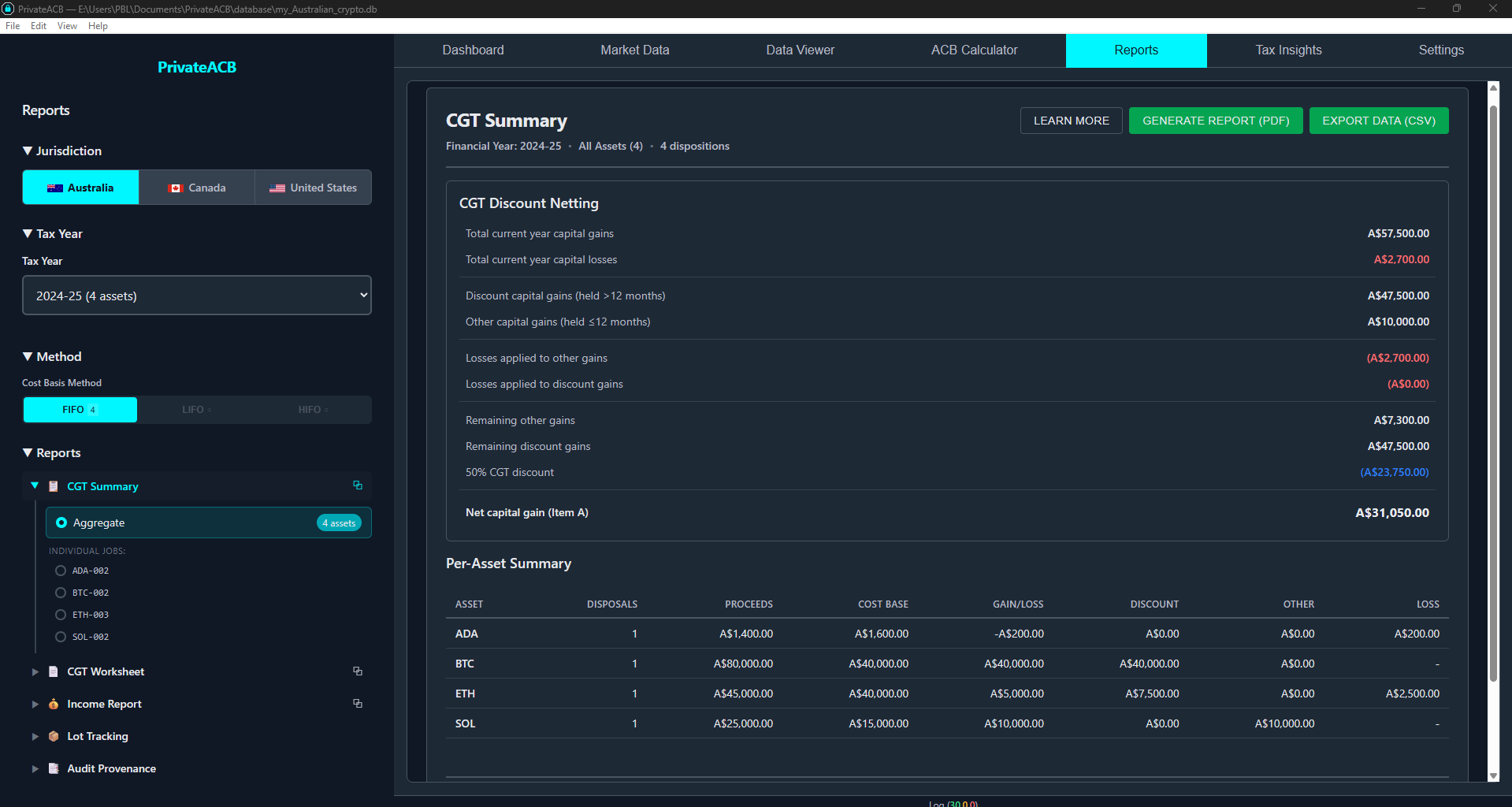
Section titled “CGT Summary Report”The CGT Summary is your primary report for completing Question 18 (Net capital gain or loss) on your Individual Tax Return.
What It Shows
Section titled “What It Shows”The report presents the full Q18 netting worksheet:
| Section | Description |
|---|---|
| Total capital gains | Sum of all gains, split into discount-eligible and non-discount |
| Total capital losses | Sum of all losses |
| Losses applied to non-discount gains | Losses offset short-term gains first |
| Losses applied to discount gains | Remaining losses offset discount gains |
| CGT discount amount | 50% of remaining discount-eligible gains |
| Net capital gain | Final amount for Question 18 |
The report also shows a per-asset breakdown so you can see which assets contributed gains and which contributed losses.
Using It for Tax Filing
Section titled “Using It for Tax Filing”The Net capital gain figure from this report goes directly into Question 18 of your Individual Tax Return. If you are using a tax agent or software like myTax, this is the primary number you need.
If your total capital gains exceed A$10,000, or you have certain other triggers, you may also need to complete a CGT Schedule — the figures from this report transfer directly.
Export Options
Section titled “Export Options”- PDF — Formatted with ATO-style headers, A$ currency prefix, DD/MM/YYYY dates
- CSV — Raw data for import into tax software or spreadsheets
CGT Worksheet
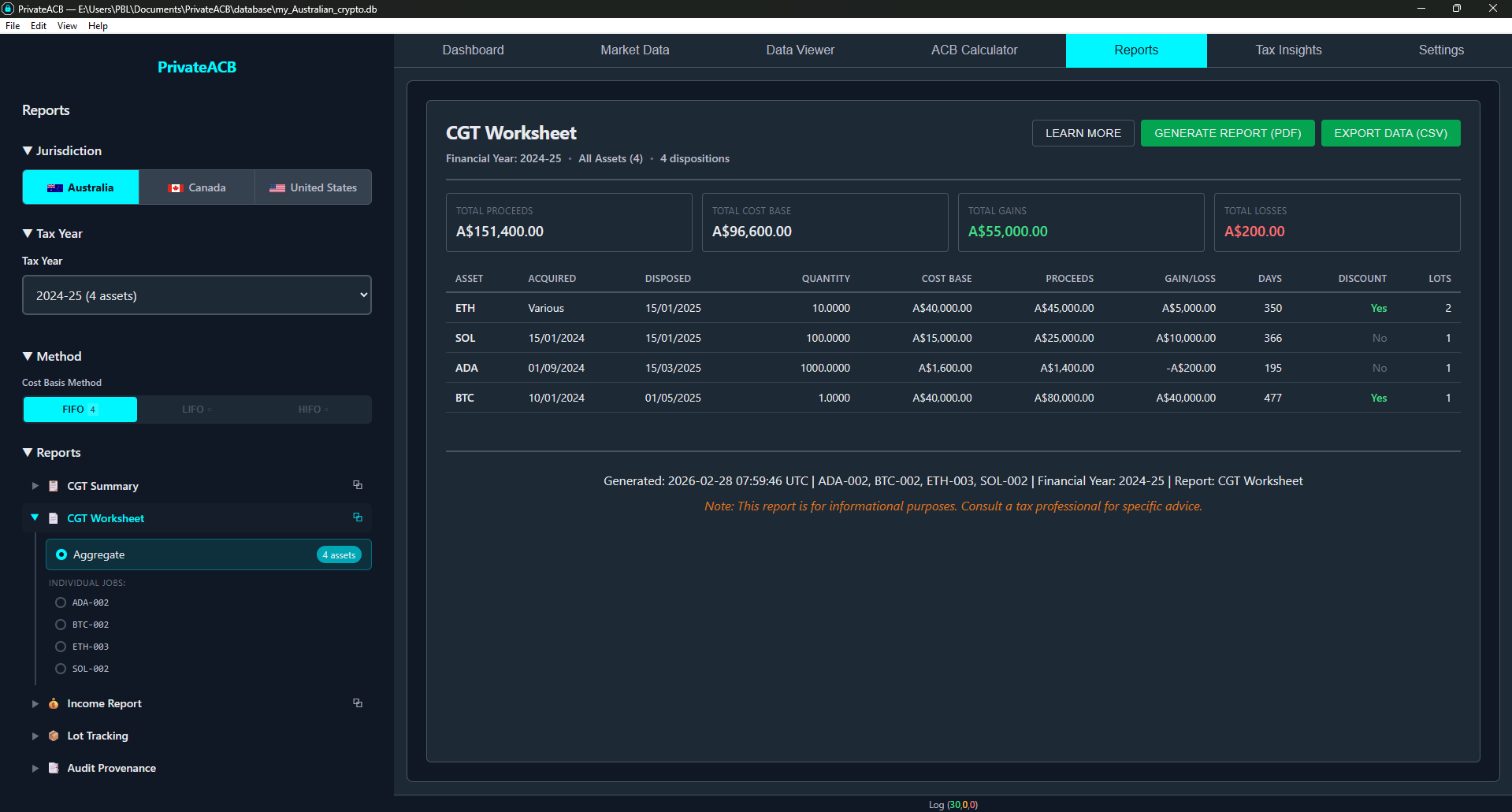
Section titled “CGT Worksheet”The CGT Worksheet provides per-disposal detail — one row for every CGT event in the financial year.
Columns
Section titled “Columns”| Column | Description |
|---|---|
| Date | Disposal date (DD/MM/YYYY) |
| Asset | Cryptocurrency symbol (BTC, ETH, etc.) |
| Quantity | Amount disposed |
| Proceeds | Sale proceeds in AUD |
| Cost Base | Original cost base of the parcel(s) used |
| Capital Gain/Loss | Proceeds minus cost base |
| Holding Period | Days held from acquisition to disposal |
| Discount Eligible | Whether the parcel qualifies for the 50% CGT discount |
| Acquisition Date | When the matched parcel was originally acquired |
| Method | FIFO, LIFO, or HIFO |
Per-Disposal Discount Tracking
Section titled “Per-Disposal Discount Tracking”Each row independently shows discount eligibility. When a single sale uses multiple parcels (e.g., selling 2 BTC that came from two different purchases), each parcel appears as a separate row with its own eligibility flag.
This level of detail is important because the ATO can request supporting documentation for how you calculated your net capital gain. The CGT Worksheet provides that evidence.
Income Report
Section titled “Income Report”The Income Report covers assessable income from crypto that is not a capital gain — primarily staking rewards, mining income, and airdrops.
What It Covers
Section titled “What It Covers”| Income Type | ATO Treatment | Tax Return Location |
|---|---|---|
| Staking rewards | Ordinary income at FMV when received | Question 2 (other income) or professional income |
| Mining income | Business income if regular, otherwise ordinary income | Question 2 or Business schedule |
| Airdrops | Ordinary income at FMV when received | Question 2 |
| Interest/lending | Interest income | Question 2 |
Currency Display
Section titled “Currency Display”All amounts are shown in AUD (A$). Prices are sourced from CoinGecko in AUD, so no foreign exchange conversion is needed for most transactions.
Lot Tracking Report
Section titled “Lot Tracking Report”The Lot Tracking report shows your tax lot inventory — every parcel of cryptocurrency you hold, have sold, or have partially sold.
What It Shows
Section titled “What It Shows”| Column | Description |
|---|---|
| Asset | Cryptocurrency symbol |
| Acquisition Date | When the parcel was acquired |
| Original Quantity | How much was in the parcel originally |
| Remaining Quantity | How much is left (0 if fully sold) |
| Cost Base | Total cost base of the parcel |
| Cost Per Unit | Cost base divided by quantity |
| Holding Period | Days held from acquisition to the end of the financial year |
| Status | Active (still holding) or Exhausted (fully sold) |
Why It’s Useful
Section titled “Why It’s Useful”- Verify lot matching — Confirm that FIFO/LIFO/HIFO is selecting the correct parcels
- Plan disposals — See which parcels are approaching the 12-month CGT discount threshold
- Audit trail — Track every parcel from acquisition through disposal
Audit Provenance Report
Section titled “Audit Provenance Report”The Audit Provenance report provides a comprehensive provenance record of your entire calculation, organised into 6 collapsible sections.
Sections
Section titled “Sections”| Section | What It Contains |
|---|---|
| A. Calculation Parameters | Jurisdiction, method, tax year, timestamp, software version |
| B. Transaction Summary | Total transactions processed, by type (buy, sell, income, etc.) |
| C. Gain/Loss Summary | Aggregate gains, losses, and net result |
| D. Method Verification | Confirms lot selection method was applied correctly |
| E. Data Quality | Price source breakdown, missing data flags, import job references |
| F. Regulatory Compliance | ATO references, applicable rules, disclaimer |
What Australia Doesn’t Have: Section G
Section titled “What Australia Doesn’t Have: Section G”In the US Audit Provenance report, Section G shows per-account (per-wallet) tracking details required by T.D. 10000. Australia does not have a per-account tracking requirement, so Section G is not included in the Australian Audit Provenance report.
Exporting Reports
Section titled “Exporting Reports”PDF Export
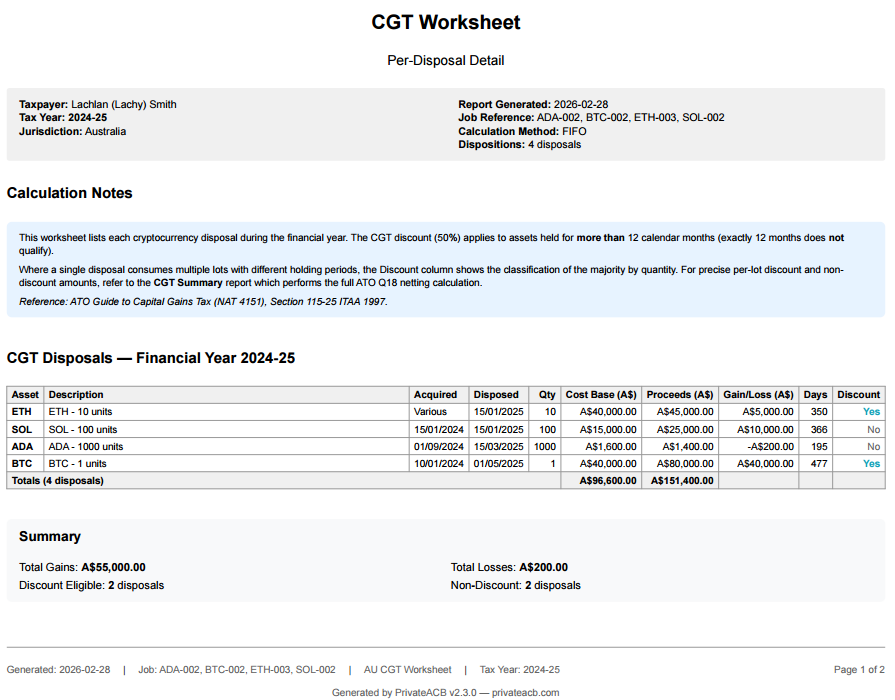
Section titled “PDF Export”All 5 reports can be exported to PDF. Australian PDFs include:
- ATO-style headers with “Australian Taxation Office” reference
- A$ currency prefix (not bare ”$”) on all monetary values
- DD/MM/YYYY date format (Australian standard)
- Financial year display as “2024-25” format
- Method notation showing FIFO, LIFO, or HIFO
Click the Export PDF button at the top of any report viewer to generate the PDF.
CSV Export
Section titled “CSV Export”All reports are also available as CSV for import into tax software, spreadsheets, or accounting packages. CSV files use comma-separated values with headers matching the report columns.
Click the Export CSV button at the top of any report viewer to download.
Using Reports for Tax Filing
Section titled “Using Reports for Tax Filing”For Your Individual Tax Return (myTax or Tax Agent)
Section titled “For Your Individual Tax Return (myTax or Tax Agent)”- Question 18 (Net capital gain/loss) — Use the net capital gain figure from the CGT Summary report
- Question 2 (Other income) — Use the total income figure from the Income Report (if applicable)
- CGT Schedule — If required (gains > A$10,000 or other triggers), use the CGT Summary figures to complete the schedule
Supporting Documentation
Section titled “Supporting Documentation”Keep these reports for your records:
- CGT Worksheet — Per-disposal evidence of how each gain/loss was calculated
- Lot Tracking — Evidence of lot selection method and parcel matching
- Audit Provenance — Full provenance trail showing the data and methodology used
The ATO can request supporting documentation for up to 5 years after assessment (longer in some cases). PrivateACB reports provide the detailed evidence needed to support your tax return.
ATO References
Section titled “ATO References”- Individual Tax Return, Question 18 — Net capital gain or loss
- Individual Tax Return, Question 2 — Other income (staking, mining)
- CGT Schedule — Required when total capital gains exceed A$10,000
- ATO Record-Keeping Requirements — 5-year retention period
- ATO Crypto Asset Guidance — What records you need to keep for crypto